
Batteries work in a simple circuit by using chemistry to separate charge and create voltage. When the circuit is closed, electrons move through the external path while ions move inside the battery, which lets the battery push current through a load such as an LED, buzzer, or resistor-powered sensor.
Last updated: June 17, 2026.
What a battery is actually doing
Students often hear that a battery "gives power" to a circuit. That is useful shorthand, but it hides the real idea. A battery stores chemical potential energy. The U.S. Department of Energy explains that when a battery is connected to an external circuit, electrons move through the circuit while ions move through the electrolyte inside the battery. That coordinated motion is what lets the battery release stored energy as electricity.
OpenStax adds the next important classroom detail: chemical reactions inside a battery separate charge, which creates a potential difference, or voltage, between the terminals. In beginner language, the battery creates the push that drives charge around the circuit once the path is complete.
How that looks in a simple student circuit
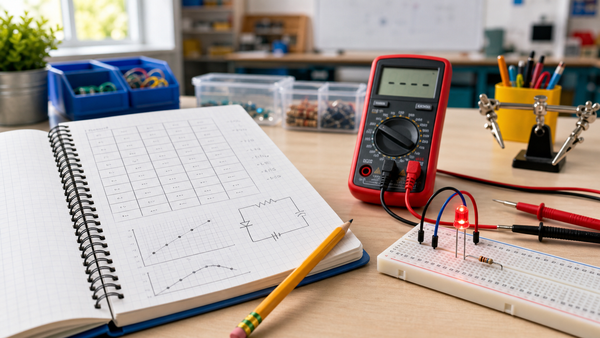
Imagine a battery, a resistor, and an LED on a breadboard. The battery has two jobs in that setup. First, it creates the voltage that pushes charge. Second, it keeps the current moving by supporting the chemical reaction that separates charge inside the cell.
When the path is closed, current can move from one battery terminal, through the wire, resistor, and LED, then back to the other terminal. If the path is broken, the battery still has stored energy, but the circuit does not have a complete route for current.
This is why battery explanations fit naturally with Mr Circuit's articles on voltage, current, and resistance. The battery creates the voltage, the current is the flow through the path, and resistance helps control how much current the battery delivers.
Battery parts students should know
| Part | Simple job |
|---|---|
| Anode | One electrode where part of the battery reaction helps release electrons into the circuit |
| Cathode | The other electrode that accepts electrons returning through the circuit |
| Electrolyte | Material inside the battery that lets ions move so the reaction can continue |
| Terminals | The external connection points students use to connect the circuit |
Most classes do not need a chemistry-heavy lesson on every battery type. What students do need is the basic picture: a battery is not just a metal can full of electricity. It is a chemical device that can maintain voltage across its terminals.
Why a battery is not an infinite source
OpenStax also explains that real batteries have internal resistance. That matters because the voltage you measure at the terminals depends on both the battery and the load attached to it. Under a light load, the terminal voltage stays close to the battery's rated value. Under a heavier load, or when the battery is weak, the battery's internal resistance causes more voltage drop inside the battery itself.
That is useful classroom language for common student observations. If a buzzer sounds weak or an LED looks dim, the reason may not be that "the battery has no electricity left." It may be that the battery cannot deliver the needed current well anymore because its internal resistance has increased or the load is too demanding.
Step by step: what happens when students connect the battery
- The battery already has chemical energy stored inside it.
- Students connect the battery to a complete circuit.
- The battery's voltage pushes charge through the external path.
- The load uses that electrical energy in a useful way, such as making light or sound.
- Ions move inside the battery so the reaction can keep balancing the charge.
- When the battery is disconnected, the circuit opens and current stops.
That sequence gives teachers a cleaner explanation than saying "the battery sends electricity into the wire." It shows both the outside path and the inside chemistry without making the lesson too advanced.
How batteries connect to safe troubleshooting
A battery can power a circuit correctly, poorly, or unsafely depending on the circuit path. If students accidentally create a very low-resistance path, the battery may deliver far too much current. OpenStax uses the idea of a load resistor to show why current depends on the total resistance in the circuit. That is also why a direct short across the battery terminals can cause heating.
For battery-powered products more broadly, the U.S. Consumer Product Safety Commission highlights the importance of suitable cells, charge and discharge protection, and short-circuit protection. In classroom terms, that supports a simple rule: batteries should power the intended load, not an accidental shortcut.
This article pairs well with Mr Circuit's short circuit explainer because students should understand that a battery is useful only when the path is complete and arranged correctly.
What teachers can say out loud during a first build
Here is a strong teacher script: The battery creates the push. The wires make the path. The resistor controls the current. The LED uses the energy in a visible way. That sentence is simple, accurate enough for beginners, and easy to repeat while students build.
It also gives students a framework for debugging. If the LED does not light, they can ask:
- Do we still have a complete path?
- Is the battery connected with the right polarity?
- Is the battery still able to supply the needed voltage?
- Did we accidentally create a shortcut around the load?
Safe battery routines for beginner labs
- Use the correct battery type for the lesson and the kit.
- Disconnect the battery before moving wires or components.
- Do not let students connect the terminals directly together.
- Replace weak or damaged batteries instead of pushing through a bad build.
- Store batteries so metal objects cannot touch both terminals.
If you are planning teacher-friendly circuit activities, Mr Circuit's simple night-light circuit guide shows how batteries fit into a structured low-voltage project. For school implementation help, the For Schools and Educators page is the next natural resource.
Common misconceptions to fix early
- Thinking the battery is just a container full of moving electrons waiting to pour out.
- Assuming the battery alone determines brightness, without considering the load and resistance.
- Believing a battery always gives exactly its label voltage no matter what is connected.
- Forgetting that the inside of the battery matters too, not just the external wires.
Fixing these ideas early makes later topics such as sensors, motors, and troubleshooting much easier to teach.
FAQ
How does a battery work in a simple circuit?
A battery uses chemistry to create voltage. When the circuit is closed, that voltage pushes charge through the external path and powers the load.
What does the battery do that a wire cannot do?
The battery creates the potential difference that pushes charge. A wire only provides a path.
Why does a battery need a complete circuit?
The chemical reaction can only drive current usefully when there is a full path from one terminal, through the load, and back to the other terminal.
Why can a battery get warm?
If the circuit draws too much current, some energy is lost as heat, including inside the battery because of its internal resistance.
What happens if students short the battery?
A short gives current a very low-resistance path, which can cause too much current to flow and may heat the battery or damage parts.
Is this explanation only true for one battery chemistry?
No. Different batteries use different chemicals, but the basic idea of charge separation, voltage, and current through a load still applies.