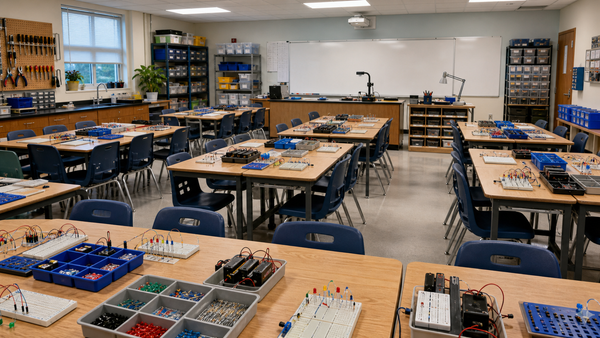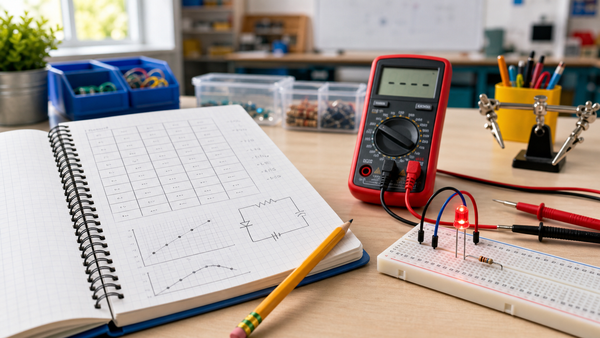

Breadboard skills still matter because they teach students how real circuits are planned, built, measured, debugged, and improved without soldering. Even when a class uses robotics kits, microcontrollers, simulation software, or prebuilt modules, students benefit from understanding how power, components, signals, and physical connections behave on a real workbench.
The point is not to teach breadboards because they are traditional. The point is to give students a low-risk place to practice the habits behind technical work: read the circuit, place the component, predict the behavior, measure the result, find the fault, and revise the build. Those habits transfer far beyond a beginner LED circuit.
What Breadboard Skills Actually Teach
A solderless breadboard is more than a plastic board with holes. It is a training space for circuit thinking. Students learn that electricity needs a complete path, that rows and rails are connected in specific ways, that polarity matters, and that a small placement error can change the whole result.
Science Buddies describes breadboards as a common base for beginner electronics projects, and TeachEngineering uses breadboard circuitry in K-12 activities that connect digital ideas to physical outputs. Those examples point to the real value: breadboards let students build something they can inspect, touch, test, and revise.
Breadboarding Builds Transferable Technical Habits
| Breadboard habit | What students practice | Where it transfers |
|---|---|---|
| Following rows and rails | Tracing electrical paths | Robotics wiring, automotive diagnostics, control panels |
| Identifying components | Recognizing resistors, LEDs, switches, sensors, and ICs | CTE electronics, repair, makerspaces, engineering labs |
| Predicting before power | Planning and risk reduction | Any troubleshooting or lab procedure |
| Measuring with a meter | Using evidence instead of guessing | Electrical maintenance, robotics, physics, mechatronics |
| Debugging one change at a time | Systematic fault finding | Programming, mechanical systems, vehicle service, HVAC controls |
These habits are especially important in CTE and career exploration. The Massachusetts Electronics Engineering Technology framework describes electronics programs as hands-on learning with tools, test equipment, procedures, and work that involves building, testing, and repairing components. Breadboards give students an approachable version of that workflow before the stakes are higher.
Why Breadboards Still Matter in Robotics
Robotics often hides electronics behind plug-in connectors and software libraries. That can be useful, but it can also cause students to treat every problem as a code problem. Breadboard practice helps students understand that a robot input may be a switch changing a signal, a sensor output may need power and ground, and an LED output only works when polarity and current limiting are correct.
When students have already built circuits on a breadboard, robot wiring feels less magical. They understand why ground must be shared, why loose connections cause intermittent behavior, and why a meter can answer questions that code cannot. Breadboard skills make robotics troubleshooting calmer and more evidence-based.
Why Breadboards Still Matter in CTE
Many career pathways now involve electronic systems, even when the job title is not electronics engineer. The U.S. Bureau of Labor Statistics notes that automotive service technicians work with electronic systems and sensors and may use scan tools, multimeters, and other electronic testing equipment. Students who have practiced circuit paths, meter readings, and component behavior are better prepared to understand those systems later.
The same pattern appears in aviation, HVAC controls, manufacturing, energy systems, and mechatronics. Students may not use a classroom breadboard on the job, but they will use the thinking: identify the input, follow the signal, check power, test the output, and document what changed.
A Simple Breadboard Skill Sequence
- Build a single LED circuit: Teach polarity, current limiting, and closed paths.
- Add a switch: Show how a mechanical action becomes an electrical input.
- Measure voltage: Check the battery and compare points in the circuit.
- Create one fault: Move one wire or reverse one LED, then troubleshoot with evidence.
- Add a sensor: Connect light, touch, or moisture changes to visible output behavior.
- Explain the system: Have students describe input, process, output, and power path.
This sequence works because each step adds one idea. Students do not need to memorize every breadboard connection on day one. They need repeated chances to connect a physical action to an electrical result.
Simulation Is Helpful, But It Is Not Enough
Simulation tools are useful for previewing circuits and reducing setup time. They can show ideal behavior clearly. But real breadboards teach details that simulations often hide: loose jumper wires, reversed LEDs, weak batteries, crowded layouts, poor documentation, and the need to slow down when something does not work.
Those details are not distractions. They are the lesson. Technical careers require students to work with imperfect systems, not just ideal diagrams. A breadboard gives students a manageable way to experience that reality.
Common Mistakes When Teaching Breadboards
- Teaching the hole pattern once and moving on: Students need repeated builds to internalize rows and rails.
- Skipping measurement: Breadboarding is stronger when students use a multimeter to verify what they think is happening.
- Using too many parts too early: Start with power, resistor, LED, switch, and one sensor before adding ICs or modules.
- Treating faults as failure: Faults are the best way to teach systematic troubleshooting.
- Letting wiring get messy: Neat layout is not cosmetic; it makes circuits easier to inspect and repair.
Where Mr Circuit Fits
Mr Circuit's no-soldering electronics labs support the reason breadboards still matter: students can build real circuits safely, see immediate results, and practice troubleshooting without needing advanced tools. For teachers, the value is not just that the circuit works. The value is that students learn how to think when it does not work yet.
That is why breadboard skills remain relevant. They are a bridge between classroom curiosity and real technical confidence.
FAQ
Are breadboards still useful for students?
Yes. Breadboards let students build and revise real circuits without soldering, which makes them useful for beginner electronics, robotics preparation, and CTE exploration.
Why teach breadboards if students use robotics kits?
Robotics kits are useful, but breadboards help students understand the physical circuits behind inputs, outputs, sensors, LEDs, and power connections.
What skills do breadboards build?
They build component identification, circuit tracing, careful layout, measurement, troubleshooting, prediction, and evidence-based revision.
Are breadboards safe for beginners?
Breadboards are appropriate for beginners when used with low-voltage classroom circuits, teacher supervision, and clear rules for batteries, polarity, and component placement.
How do breadboard skills connect to CTE?
CTE pathways often require students to build, test, diagnose, and repair technical systems. Breadboard work gives students an early version of those habits in a low-risk setting.