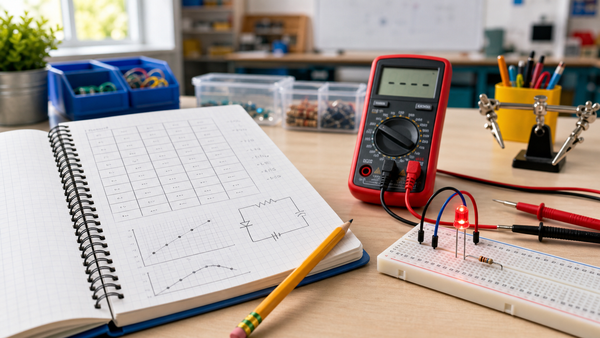

A continuity tester is a simple tool that tells you whether a path is complete. In a student build, a small battery sends current through an LED or buzzer only when the probes touch a complete path, so students can check wires, switches, and breadboard rows safely on unpowered circuits. It is one of the best beginner tools because it turns an abstract idea into immediate feedback.
Last updated: June 16, 2026.
What continuity means before you build anything
Continuity means there is a complete electrical path between two points. If the path is complete, current can move through the tester circuit and trigger the indicator. If the path is broken, the indicator stays off.
That matches the simple-circuit explanation in OpenStax's chapter on current. Students do not need advanced math to understand the big idea. They need to see that current only moves when the loop is complete.
Why build a continuity tester when multimeters already exist?
A digital multimeter is more flexible, and Mr Circuit's multimeter teaching guide is still the right next step. But a continuity tester has one major teaching advantage: it is simple enough for beginners to understand as a circuit.
| Tool | Best for | Why it helps beginners |
|---|---|---|
| Continuity tester | Checking whether a path is complete | Students can see how the test tool itself is just another circuit |
| Digital multimeter | Voltage, resistance, current, and continuity mode | More powerful, but takes longer to learn well |
Parts list for a simple student continuity tester
| Part | Role in the build |
|---|---|
| 3V to 9V battery pack | Provides the test voltage |
| Breadboard | Holds the circuit safely |
| 2N3904 transistor | Acts as a simple switch to drive the indicator path |
| Piezo buzzer | Gives an audible signal |
| LED and resistor | Provide a visible signal |
| Two test leads or jumper wires | Touch the circuit under test |
The onsemi 2N3904 datasheet describes the transistor as a general-purpose switch, which is exactly how students should think about it here. And Murata's buzzer basics are useful because they explain why a buzzer is a practical alert component in a small test circuit.
Before building: one important safety rule
Only use a continuity tester on unpowered circuits. Disconnect the battery from the circuit you want to test. A continuity tester is meant to check whether a path exists, not to diagnose live household wiring or powered classroom circuits.
This is the most important sentence in the article. Repeat it in class if needed.
Step-by-step build
- Place the transistor on the breadboard so its legs are in separate rows.
- Wire the LED and current-limiting resistor into the output side of the circuit.
- Add the buzzer so students can hear the result as well as see it.
- Connect the battery pack to power rails on the breadboard.
- Attach one probe lead to the circuit reference side.
- Attach the second probe lead so that when both probes meet through a complete path, the transistor can switch the indicator on.
- Test the tool by touching the probes together briefly. The LED or buzzer should respond.
If students are not ready for the transistor version, a simpler LED-and-resistor tester can work too. The transistor-assisted version is helpful because it gives a stronger signal and introduces switching in a practical way.
How to test the design before using it on real projects
The PhET Circuit Construction Kit: DC is useful before the physical build. Students can compare a complete path with a broken path and predict what the tester should do. That makes the physical breadboard build less mysterious.
Once the tester is built, try three simple checks:
- Touch the probes together directly. The tester should respond.
- Touch the probes across a loose wire. The tester should respond if the wire is good.
- Touch the probes across an open switch. The tester should stay off until the switch closes.
What students learn from this build
This project teaches more than one tool. Students learn that a test instrument is also a circuit. They also learn that troubleshooting starts with a simple question: Is the path complete?
That makes the tester a strong partner to Mr Circuit's open vs closed circuit article and the student troubleshooting checklist. Together, those resources help students move from guessing to evidence.
Common mistakes while building the tester
- Testing a circuit that still has its own battery connected.
- Placing the transistor legs in the wrong breadboard rows.
- Forgetting the resistor for the LED.
- Using probes that are loose or too short to make clean contact.
- Assuming silence always means the wire is bad when the tester itself may be wired incorrectly.
These are normal early errors. They also make good teacher check-in moments because each one leads back to circuit tracing.
A quick classroom troubleshooting routine
- Check the tester on itself first by touching the probes together.
- Confirm the circuit under test is not powered.
- Test one path at a time instead of touching multiple parts at once.
- If there is no signal, inspect the tester before blaming the project wire.
- Compare the result with a multimeter when possible.
That final comparison is useful because it helps students see that more advanced tools often confirm the same basic reasoning.
Where Mr Circuit fits naturally
This build works well after a first circuit unit and before a more formal measurement lesson. The Mr Circuit Lab 1 Basic Electronics STEM Kit provides a natural source of beginner components, and the Lab 2 Digital Multimeter STEM Kit becomes the logical next step once students understand continuity as a concept.
For teachers planning a broader sequence, the For Schools and Educators page is the right follow-up.
FAQ
What does a continuity tester do?
It checks whether a complete path exists between two points in an unpowered circuit.
Can students build one instead of buying one?
Yes. A simple battery, indicator, and a few breadboard parts are enough for a beginner classroom version.
Should the circuit under test be powered?
No. Disconnect power first. A continuity tester is for unpowered circuits only.
Why use a buzzer and an LED?
The LED gives a visual signal, and the buzzer gives an audible one. Together they make the result easier to notice in class.
Is this better than a digital multimeter?
It is not more powerful, but it is often better for first teaching because students can understand exactly how the tool works.
What should students test first?
Start with the tester itself by touching the probes together. Then test simple wires, switches, and breadboard paths one at a time.